1. My biggest discovery was discovering that there are more places I can send my students to research than just the internet! This way I am getting information I want them to get instead of ehow or ask.com answers.
2. I will promote this to my students by giving them appropriate reference lists when doing a project. So I'll make a suggested source page with the information. Depending what the topic is will be where I send the students on this site. And since it is all ready to be accessed when we are in school it will be easier and I will make sure that I give them the information to access it outside of school. I will listen to co-workers when they are stumped and suggest it where needed.
Thank you so much for this opportunity! It was wonderful exploring the library!
Monday, March 31, 2014

Monday, March 10, 2014
Lesson 9 -- History and Genealogy Resources—Ancestry Library, Heritage Quest and Sanborn Maps
1. In Ancestry.com I searched my married name Elizabeth Rose Ketterling with birth date and nothing related to me came up, but I found lots of Elizabeth Ketterling's or Rose Ketterlings in the area. That is fun. I changed to my maiden name Elizabeth Rose Keihl and found nothing related to me. So I searched I added the location of South Dakota. No results showed.
Since I am interested in finding my deceased brother's wife I searched his name Daniel A Kemmer and his information popped up right away! I searched marriage licences and found his spouse's maiden name! This tool is real neat and you were right, never been interested in this before but may find a real interest now!
2. I searched for my grandmother I only met as an infant Mildred Keihl. Unfortunately I don't know her maiden name. I did an advanced search though adding my grandpa's name in to narrow the search and the first 3 searches came up with both their information :) I found where they lived in 1952 which was 224 Willow Drive Red Bank, NJ. Knowing my dad's birthdate he was 9 when they lived there. I found out she died Jan 12 1988, just shy of one month of my little sister's birth. This search was very fun.
3. It said there were no pictures unique to South Dakota, so I clicked the link that said picture collections related to South Dakota.
The following is a list of types of pictures I could choose from
Since I am interested in finding my deceased brother's wife I searched his name Daniel A Kemmer and his information popped up right away! I searched marriage licences and found his spouse's maiden name! This tool is real neat and you were right, never been interested in this before but may find a real interest now!
2. I searched for my grandmother I only met as an infant Mildred Keihl. Unfortunately I don't know her maiden name. I did an advanced search though adding my grandpa's name in to narrow the search and the first 3 searches came up with both their information :) I found where they lived in 1952 which was 224 Willow Drive Red Bank, NJ. Knowing my dad's birthdate he was 9 when they lived there. I found out she died Jan 12 1988, just shy of one month of my little sister's birth. This search was very fun.
3. It said there were no pictures unique to South Dakota, so I clicked the link that said picture collections related to South Dakota.
The following is a list of types of pictures I could choose from
All related to South Dakota
| Library of Congress Photo Collection, 1840-2000 | 615,248 |
| U.S., Historical Postcards | 115,977 |
| Selected U.S. Headstone Photos | 94,225 |
| U.S. Family Photo Collection, c. 1850-2000 | 16,935 |
| U.S. Civil War Photos, 1860-1865 | 6,846 |
| African American Photo Collection, 1850-2000 | 4,141 |
| U.S. Panoramic Photos, 1851-1991 | 3,764 |
| Professional Baseball Players,
1876-2004 (with images) I clicked on US family photo collections then I had to search a family. I am starting with Keihl in South Dakota. 3 photos came up from Iowa. I am going to search Ketterling, my married name and South Dakota, zero results. I also searched Nash and Layton which is family names. No results for South Dakota. The pictures that did come up were adorable black and white photos. I looked for other pictures and you can search through year books! That would be a fun trip! when I have some time. 4. I searched people because now I am interested. There is no results for Keihl. I searched my mom's maiden name Nash and there were 355 articles with people with the surname Nash! Most are from historical society newsletters. 5. I selected Aberdeen for the city July 1929-Oct 1960. I am not going to lie I could see this being useful, but I don't know how I am it would be useful to me. It was like reading a foreign language! Good luck to whomever can find this useful. |
Monday, March 3, 2014
Lesson 8
World Cat
There are ALOT of ways to search besides keywords. You could know little or a lot about a book and search to find results.
I searched World Cat for A Cedar Cove Christmas, the first book that got me introduce to Cedar Cove series by Debbie Macomber. The first two entries had the same title; the first entry showed the book was available at 2,278 libraries worldwide, and the 2nd entry, same book, showed 1,084 libraries worldwide! I clicked on the libraries worldwide link and the first library that showed was the Alexander Mitchell Library right here in Aberdeen! There are 3 different types of call numbers for this book listed. I will give the Dewey call number because most libraries in our region use this type: 813.54. Other things you can click on besides the author and subject would be descriptors of the book, then more books with similar descriptors come up, and genre/form, so more books with the same genre come up. I feel this is really neat because I love a certain author's series then have a hard time finding books like it, now I can use this and find things that meet what I like!
OAIster
I searched South Dakota like we were told too. I clicked on the Annual report with the author of SD Dept of Social Services. I couldn't "access" it like it said to do. There is only one library world wide that has the report and that is the South Dakota State Library. I was then viewing the page with all the information on it and it showed I could "access" it through a website because it is an online document. I clicked on the first access link and it took me to another database to search, I clicked the second and it gave me a list of the reports it was referring to. It was rather confusing, but nice to know that we have access to these kinds of reports!
As for other blogs....
I clicked EVERY link under the basic challenge and noone had completed this one yet... I guess I am a go getter getting this done on a Monday.... I will check back later to see what everyone else has come up with.
There are ALOT of ways to search besides keywords. You could know little or a lot about a book and search to find results.
I searched World Cat for A Cedar Cove Christmas, the first book that got me introduce to Cedar Cove series by Debbie Macomber. The first two entries had the same title; the first entry showed the book was available at 2,278 libraries worldwide, and the 2nd entry, same book, showed 1,084 libraries worldwide! I clicked on the libraries worldwide link and the first library that showed was the Alexander Mitchell Library right here in Aberdeen! There are 3 different types of call numbers for this book listed. I will give the Dewey call number because most libraries in our region use this type: 813.54. Other things you can click on besides the author and subject would be descriptors of the book, then more books with similar descriptors come up, and genre/form, so more books with the same genre come up. I feel this is really neat because I love a certain author's series then have a hard time finding books like it, now I can use this and find things that meet what I like!
OAIster
I searched South Dakota like we were told too. I clicked on the Annual report with the author of SD Dept of Social Services. I couldn't "access" it like it said to do. There is only one library world wide that has the report and that is the South Dakota State Library. I was then viewing the page with all the information on it and it showed I could "access" it through a website because it is an online document. I clicked on the first access link and it took me to another database to search, I clicked the second and it gave me a list of the reports it was referring to. It was rather confusing, but nice to know that we have access to these kinds of reports!
As for other blogs....
I clicked EVERY link under the basic challenge and noone had completed this one yet... I guess I am a go getter getting this done on a Monday.... I will check back later to see what everyone else has come up with.
Monday, February 24, 2014
Week 7 Ebooks on Ebscohost
1. I did a search on sewing since I am currently teaching two sewing classes. The first book that came up was The Complete Idiot's Guide to Sewing. The rest of the searches were not even related to sewing. Things about the internet and fort worth came up. The search results tell the books title, the author, the publisher, the publishing date, and what other topics it could be searched under. You can view the ebook full text, the table of contents or the most relevant pages from the Ebook. Clicking on the title gives you more detailed information about the book and the most relevant pages from the ebook. On the left hand side there is the option to view the book full text. It appears that the book in full text is a scanned in version of the book. The viewer gives options to go next, fit width to page, type in the page number you are looking for and zoom in or out on the information. On the left hand side of the viewer you can view the table of contents and click on parts you would like to see.
2.The recommendations I could make to the students needing more information on the constitution would be as follows:
Representing Popular Sovereignty : The Constitution in American Political Culture
Our Elusive Constitution : Silences, Paradoxes, Priorities
The Constitution, the Law, and Freedom of Expression
The Constitution of the United States of America
3. I typed in Oklahoma when doing the PB publisher advanced search. I found multiple titles about the old West and Native American culture. One book came up about ancient Egypt! There were 80 titles found. The top five titles sorted by relavance included:
Biodiversity and Native America
The Western Range Revisited : Removing Livestock From Public Lands to Conserve Native Biodiversity
America's National Historic Trails
The Rapid City Indian School, 1898-1933
The Great Goddesses of Egypt
2.The recommendations I could make to the students needing more information on the constitution would be as follows:
Representing Popular Sovereignty : The Constitution in American Political Culture
Our Elusive Constitution : Silences, Paradoxes, Priorities
The Constitution, the Law, and Freedom of Expression
The Constitution of the United States of America
3. I typed in Oklahoma when doing the PB publisher advanced search. I found multiple titles about the old West and Native American culture. One book came up about ancient Egypt! There were 80 titles found. The top five titles sorted by relavance included:
Biodiversity and Native America
The Western Range Revisited : Removing Livestock From Public Lands to Conserve Native Biodiversity
America's National Historic Trails
The Rapid City Indian School, 1898-1933
The Great Goddesses of Egypt
Wednesday, February 19, 2014
Week 6 Gale Virtual Reference Library
1. I choose the Junior Worldmark Encyclopedia of Foods and Recipes of the World,
2012, since I am a FACS teacher and that is one of our specialties. There are 4 volumes of this Encyclopedia, broken up alphabetically by country origin of the foods. There is a World's Food class in our department. If I would ever have to teach this class I would utilize this book ALL the time to teach about the countries and then have authentic recipes for students to try. This book excites me so much. I am going to be sharing it with the teacher that does teach it! The best part is the recipes are labeled with the original title and then converted to English and then all the recipes are in forms that the students use.
2. I search FSH because recently had a test done for levels with this in my own body and want to know more information on it. There are 79 search results. It was sorted by relavance which brought many articles about FSH and testing for it. I then searched by date published so I could have the most current information. It came up with a book published in 2013 with many articles related to FSH. There was a article on premature menopause relating to FSH saying that if a woman is going through that the FSH level would be very high, mine is very low so I must be safe from that! According to another article this test should be done on the third day of the period for the most accurate results. Very good information. Short and to the point articles. I really like this resource.
3. I will post on other blogs Friday so more people have time to complete this!
2. I search FSH because recently had a test done for levels with this in my own body and want to know more information on it. There are 79 search results. It was sorted by relavance which brought many articles about FSH and testing for it. I then searched by date published so I could have the most current information. It came up with a book published in 2013 with many articles related to FSH. There was a article on premature menopause relating to FSH saying that if a woman is going through that the FSH level would be very high, mine is very low so I must be safe from that! According to another article this test should be done on the third day of the period for the most accurate results. Very good information. Short and to the point articles. I really like this resource.
3. I will post on other blogs Friday so more people have time to complete this!
Monday, February 10, 2014
Lesson 5 ProQuest
1. I choose the topic Preschool for my ProQuest search since I am in the middle of picking a preschool for my youngest and planning to teach the Preschool Child Development class this spring. After I hit enter a bar under the search bar comes up with "related searches" which are more defined searches on the preschool topic such as: Preschool Education; Preschool education AND Early childhood education. Followed by this bar is how many results the search produced, the ability to search within the search results, create an alert and save the search. The next bar down then allows you to save, email, print, cite and export the documents selected. Below that you can choose if you want the brief view or detailed view. Each article entry is then listed with the title, a quick description of what the article is about, and clips of any images that go along with it. On the right hand side you can sort your search, it automatically comes up with relevance, but can be sorted by publication date, oldest first or newest first. There is also a long list of ways you can narrow your search depending on what you are looking for.
1.a. I visited many of the blogs. I found that they are extremely BORING and just regurgitating facts. I am not going to make it my goal to personalize and make this fun! I ended up comment on the Tatted Librarian because she was so detailed and personal with her posts! Loved it!
2. I did a search for Home and the first magazine that came up was Better Homes and Gardens, which I use a lot in my classes for articles and cut and paste things. It surprised me that the 7th result was Journal of Family and Consumer Sciences. Home wasn't in the title but it is in the content.
Each entry gives a summary including the magazine title the volumes that are covered in full text; coverage in any format; the Publisher; ISSN number; place of publication; and publication title history.
I think that it is neat to see what the magazines used to be titled :)
On the right hand side, there is a tool box that will help narrow searches for the publications down also.
1.a. I visited many of the blogs. I found that they are extremely BORING and just regurgitating facts. I am not going to make it my goal to personalize and make this fun! I ended up comment on the Tatted Librarian because she was so detailed and personal with her posts! Loved it!
2. I did a search for Home and the first magazine that came up was Better Homes and Gardens, which I use a lot in my classes for articles and cut and paste things. It surprised me that the 7th result was Journal of Family and Consumer Sciences. Home wasn't in the title but it is in the content.
Each entry gives a summary including the magazine title the volumes that are covered in full text; coverage in any format; the Publisher; ISSN number; place of publication; and publication title history.
I think that it is neat to see what the magazines used to be titled :)
On the right hand side, there is a tool box that will help narrow searches for the publications down also.
Tuesday, February 4, 2014
Lesson 4 -- SIRS Issues Researcher and Discoverer
SIRS Discoverer
1. I like when I started typing armadillos in the search bar of the SIRS discoverer that suggestions that fit the letters I was typing came up. I think this would be beneficial to younger students that might not know how to spell the whole word.
When the search results came up there are tabs at the top with all articles, newspaper, magazine, reference, graphics and webfinds. This would help students easily pick from the type of resource they wanted in the first place. The list is automatically sorted by relevance to the word search, but can be sorted by date of material and the lexile. The search results have a little picture of what source it is by it. The first four resources when searching armadillo are magazine sources. Behind each title there is a book with a color that shows the reading level, an apple representing subjects and a camera showing that there is a picture with the article. I really that that under each clickable title it has the source already properly cited so the students would just need to copy this for their bib pages.It also has a summary of the article and the descriptors that could be searched to find this article.
2. Country Facts has recently been updated per the little sign next to it before I click on it. Once clicked on the country facts brings up 3 different boxes: Country Facts, with a A-Z list of countries to click on; State facts with the option of regions of the United States or an A-Z list; and Canada facts, broke up into territories and provinces or an A-Z list. I clicked the A-Z list for the states and then clicked on OHIO. It brought up basic facts and the flag about Ohio, with more links to other information.
Maps of the world brings up 7 globe like icons for various map types. This could be used for studying states and countries. The historical ones could help with talking about history and understanding the land then better than using a today map to explain history. These maps would aide tremendously with a project of planning a trip across the country or to another country. These could be used if a new student comes from somewhere else than the town you are in or if you have foreign exchange students.
I clicked on the activities link on the right hand side. Up came a list of 22 categories of different types of activities ranging from art projects to health projects to social issue projects. I clicked on health projects (because I can teach health) and a list of resources with health related activities came up. Most relevant ones were reference materials then magazine articles.
SIRS Issues Researcher
1. I clicked on the leading issue ADHD (which is a new topic). At the left it gives a little summary of this issue with option of clicking more to continue reading on the topic. Below that are research tools that include topic overview, timeline, global impact, statistics, my analysis and note organizer. In the middle there is a pro/con section that gives a topic question "Are children being overmedicated for attention deficit hyperactivity disorder?Are children being overmedicated for attention deficit hyperactivity disorder?" which relates directly with ADHD and then there are boxes with lines for the pros and the cons. Once clicked on it brings up more information to support the side. On the far left there is also a video clip about medicating kids with ADHD.
2. I clicked on the Health tab in the curriculum pathfinder. This had so much stuff I could use in my classroom! On the left it has a my course section with categories and then subcategories with links to them. In the middle it has randomly placed research ideas with active links to information on each. On the far left it has videos clips that go with the health topics. This is great stuff! I will be showing the kids how to link to this the next time I have topics like these! I bet their papers will be packed with so much good information they won't have to worry about the page limitations any more!
1. I like when I started typing armadillos in the search bar of the SIRS discoverer that suggestions that fit the letters I was typing came up. I think this would be beneficial to younger students that might not know how to spell the whole word.
When the search results came up there are tabs at the top with all articles, newspaper, magazine, reference, graphics and webfinds. This would help students easily pick from the type of resource they wanted in the first place. The list is automatically sorted by relevance to the word search, but can be sorted by date of material and the lexile. The search results have a little picture of what source it is by it. The first four resources when searching armadillo are magazine sources. Behind each title there is a book with a color that shows the reading level, an apple representing subjects and a camera showing that there is a picture with the article. I really that that under each clickable title it has the source already properly cited so the students would just need to copy this for their bib pages.It also has a summary of the article and the descriptors that could be searched to find this article.
2. Country Facts has recently been updated per the little sign next to it before I click on it. Once clicked on the country facts brings up 3 different boxes: Country Facts, with a A-Z list of countries to click on; State facts with the option of regions of the United States or an A-Z list; and Canada facts, broke up into territories and provinces or an A-Z list. I clicked the A-Z list for the states and then clicked on OHIO. It brought up basic facts and the flag about Ohio, with more links to other information.
Maps of the world brings up 7 globe like icons for various map types. This could be used for studying states and countries. The historical ones could help with talking about history and understanding the land then better than using a today map to explain history. These maps would aide tremendously with a project of planning a trip across the country or to another country. These could be used if a new student comes from somewhere else than the town you are in or if you have foreign exchange students.
I clicked on the activities link on the right hand side. Up came a list of 22 categories of different types of activities ranging from art projects to health projects to social issue projects. I clicked on health projects (because I can teach health) and a list of resources with health related activities came up. Most relevant ones were reference materials then magazine articles.
SIRS Issues Researcher
1. I clicked on the leading issue ADHD (which is a new topic). At the left it gives a little summary of this issue with option of clicking more to continue reading on the topic. Below that are research tools that include topic overview, timeline, global impact, statistics, my analysis and note organizer. In the middle there is a pro/con section that gives a topic question "Are children being overmedicated for attention deficit hyperactivity disorder?Are children being overmedicated for attention deficit hyperactivity disorder?" which relates directly with ADHD and then there are boxes with lines for the pros and the cons. Once clicked on it brings up more information to support the side. On the far left there is also a video clip about medicating kids with ADHD.
2. I clicked on the Health tab in the curriculum pathfinder. This had so much stuff I could use in my classroom! On the left it has a my course section with categories and then subcategories with links to them. In the middle it has randomly placed research ideas with active links to information on each. On the far left it has videos clips that go with the health topics. This is great stuff! I will be showing the kids how to link to this the next time I have topics like these! I bet their papers will be packed with so much good information they won't have to worry about the page limitations any more!
Monday, January 27, 2014
Lesson 3
1. There are so many practice tests on there for everything!
2. I took the GED Reasoning through Lang Arts. I love how it gives you specific instructions on how to take the test and use the system appropriately! I found there is learner mode and practice mode which would be beneficial if you just started practicing and needed help learning the information and then could practice after the learner mode. I loved how it broke everything that they are scoring down and gave you what percent was right and what needed to be improved on. The test experience was great. Very well instructed, laid out and easy to use. I did keep scrolling down and wanted to hit next on the right side of the screen where it said score test.
3. Once clicking on Job Search and Workplace skills it comes up with a bunch of e books. I clicked on 100 conversations for career success. A pdf came up with 123 pages. I am not sure what courses I am to add on this center to my center. I think the type of information on here is very beneficial and I am planning on using it with my SuperStudy with career planning.
4. I typed the term communication in the search tool. MTEL: Communication and Literacy Skills ebook came up. The PDF came up for the MTEL test prep in Communication and literacy. It is 313 pages long with a full 10 chapter book explaining communication.
2. I took the GED Reasoning through Lang Arts. I love how it gives you specific instructions on how to take the test and use the system appropriately! I found there is learner mode and practice mode which would be beneficial if you just started practicing and needed help learning the information and then could practice after the learner mode. I loved how it broke everything that they are scoring down and gave you what percent was right and what needed to be improved on. The test experience was great. Very well instructed, laid out and easy to use. I did keep scrolling down and wanted to hit next on the right side of the screen where it said score test.
3. Once clicking on Job Search and Workplace skills it comes up with a bunch of e books. I clicked on 100 conversations for career success. A pdf came up with 123 pages. I am not sure what courses I am to add on this center to my center. I think the type of information on here is very beneficial and I am planning on using it with my SuperStudy with career planning.
4. I typed the term communication in the search tool. MTEL: Communication and Literacy Skills ebook came up. The PDF came up for the MTEL test prep in Communication and literacy. It is 313 pages long with a full 10 chapter book explaining communication.
Wednesday, January 22, 2014
Lesson 2 Mango Language
1. The language I choose was Dari. 9 MILLION people speak this language (and I hadn't even heard of it!). It is spoken in Afghanistan and Pakistan. This was all the information available before launching. It is one of two official languages of Afghanistan and serves as a common language for all the ethnic groups. Men greet men with handshakes and women greet each other with 3 kisses, but members of the opposite sex do not greet each other.
2. I think this program would be wonderful to learn a new language. It not only teaches you the language but the cultural ways of it too. I like that it shows you what they will be saying in English and then as they say them it shows what it was look like in Dari. And it repeated the same words so on slide 3 we saw a conversation using simple greetings with the English to Dari translation and then they spoke it in Dari. The next slide was just one word from the first phrase. Again shown in English, Dari and spoken. I like that the button appeared so you could hear it over and over if you like. Then the next slide went on to the next words heard in the greeting. I don't like how small the new language font appears. If I was copying it or tracing it from the screen I don't think that I would get the words accurately wrote out.
I think that this would be wonderful to use if I get a foreign exchange student in my SuperStudy for a year so they can feel more at home and for me to help connect with them.
2. I think this program would be wonderful to learn a new language. It not only teaches you the language but the cultural ways of it too. I like that it shows you what they will be saying in English and then as they say them it shows what it was look like in Dari. And it repeated the same words so on slide 3 we saw a conversation using simple greetings with the English to Dari translation and then they spoke it in Dari. The next slide was just one word from the first phrase. Again shown in English, Dari and spoken. I like that the button appeared so you could hear it over and over if you like. Then the next slide went on to the next words heard in the greeting. I don't like how small the new language font appears. If I was copying it or tracing it from the screen I don't think that I would get the words accurately wrote out.
I think that this would be wonderful to use if I get a foreign exchange student in my SuperStudy for a year so they can feel more at home and for me to help connect with them.
Tuesday, January 21, 2014
Lesson 2 Chilton Library
http://www.chiltonlibrary.com/select.aspx
1. According to the maintenance chart for my vehicle, 2010 Chrysler Town and Country, every 30,000 miles I should
3. My vehicle does not have access to the repair tab. I choose a 2005 Chrysler Town and Country and that one did have access to the repair tab.
With brakes you are not to mix rotor types because noise and wear problems will occur.
Calipers are not interchangeable.
You must bleed the hydrollic system to rid it of air if a line becomes unattached.
There are some great pictures on this site of brakes, bleeding the hydrollics.
1. According to the maintenance chart for my vehicle, 2010 Chrysler Town and Country, every 30,000 miles I should
- Adjust parking brake on vehicles equipped with four-wheel disc brakes.
- Inspect and service battery
- Replace engine air filter
3. My vehicle does not have access to the repair tab. I choose a 2005 Chrysler Town and Country and that one did have access to the repair tab.
With brakes you are not to mix rotor types because noise and wear problems will occur.
Calipers are not interchangeable.
You must bleed the hydrollic system to rid it of air if a line becomes unattached.
There are some great pictures on this site of brakes, bleeding the hydrollics.
Friday, January 17, 2014
Lesson 1C
1. This world book could be used in our library because we have a lot of English as Second Language learners. They could use this for information themselves. Teachers and other students could use this to better connect with the student by having a mini Spanish lesson. This could bring culture into the classroom.
2. This could be used in our library for the Spanish class students. They would be able to hear the words being spoken along with seeing the words. This would help them practice their Spanish and help they learn pronunciation.
2. This could be used in our library for the Spanish class students. They would be able to hear the words being spoken along with seeing the words. This would help them practice their Spanish and help they learn pronunciation.
Lesson 1B
1. 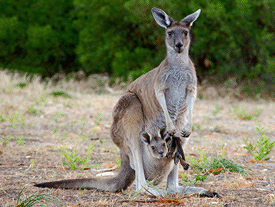 Kangaroos live in central, southern, and eastern Australia.
2. The info finder version has a lot more information on Kangaroos. They have the same video, but the Kids version has a few sentences on kangaroos, this one has a few paragraphs on Kangaroos.
3. I searched Canada in the reference center. The first screen on the left gives you all the different types of media that contain information on my searched country. The middle gives you the results. The right side gives you primary sources that can be used to get information about the searched subject. Once clicked on the entry I wanted, the right has the primary source option still, just smaller and the left has the index of the article for quicker searching on topics of the country. I think this is the part that would be most used to help patrons get to the information they are looking for more quickly.
Kangaroos live in central, southern, and eastern Australia.2. The info finder version has a lot more information on Kangaroos. They have the same video, but the Kids version has a few sentences on kangaroos, this one has a few paragraphs on Kangaroos.
3. I searched Canada in the reference center. The first screen on the left gives you all the different types of media that contain information on my searched country. The middle gives you the results. The right side gives you primary sources that can be used to get information about the searched subject. Once clicked on the entry I wanted, the right has the primary source option still, just smaller and the left has the index of the article for quicker searching on topics of the country. I think this is the part that would be most used to help patrons get to the information they are looking for more quickly.
Lesson 1a
1. 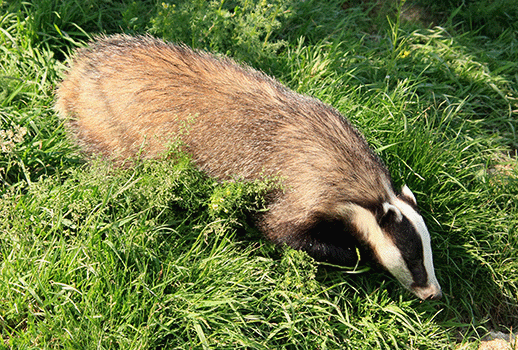
The only thing the World Book School Kids edition says about the Badger's habitat is that they live close to the ground to dig and hunt small animals and they live at night.
2. The World Book School Student edition has MUCH more information on badgers. Although they do not have a huge picture in the entry like the Kids edition, it does have the same map and video on the badger. The kids edition has a few sentences to tell about the badger where the Student edition have paragraphs of information.
3. On the left side of the results screen shows all the types of material that has information on South Africa, the country I choose to search. On the right side has all the primary sources that could be used to get information on South Africa. Once I click on the link, the main encyclopedia entry is in the middle and on the right has the index of the article that can be clicked on to get you to the part of the article you are interested in the most. Options would include the intro, people, land climate, and economy. On the right side there are still options for the primary sources and related information to the article. I think that patrons would really want the main article the most, but the index on the left is going to be the most helpful so they can get to the specific information quickest.
4. The World Book Discoverer offers many tools to help patrons that are not good English readers. The first tool is the read aloud toolbar that reads the article to you. Secondly, double click define a word function that defines the word for you. Lastly the whole left hand side is to help translate the entry into a different language.
Subscribe to:
Posts (Atom)